Table of Contents
When a website does not load, content is unavailable in your country, or an app suddenly restricts access, the explanation is often described vaguely as “internet blocking.” In reality, there is no single type of block, no universal authority controlling access, and no one-size-fits-all solution.
Internet blocking, access control, and online privacy operate across multiple technical layers, each governed by different actors and rules. Understanding these layers is essential if you want to know what tools like VPNs actually change, and where their limits are.
This guide explains how internet access and blocking work in practice, without shortcuts or myths.
The Layers of Internet Access
Every time you visit a website or use an online service, your connection passes through several distinct layers. Blocking or restrictions can occur at any of them.
At a high level, these layers include:
- the network and ISP layer
- the DNS layer
- the IP routing layer
- the platform or service layer
- the account and identity layer
Each layer operates independently. A block at one layer does not automatically imply control at the others. When access fails, the underlying cause depends on where the restriction occurs, which we break down step by step in our guide on what actually happens when a website is blocked.
Network and ISP-Level Blocking
Your internet service provider controls the physical connection between your device and the wider internet. At this level, restrictions are typically implemented for operational or policy reasons.
Common ISP-level controls include:
- DNS filtering
- IP address blocking
- traffic routing restrictions
- optional parental or content controls
These mechanisms affect traffic before it reaches the destination website.
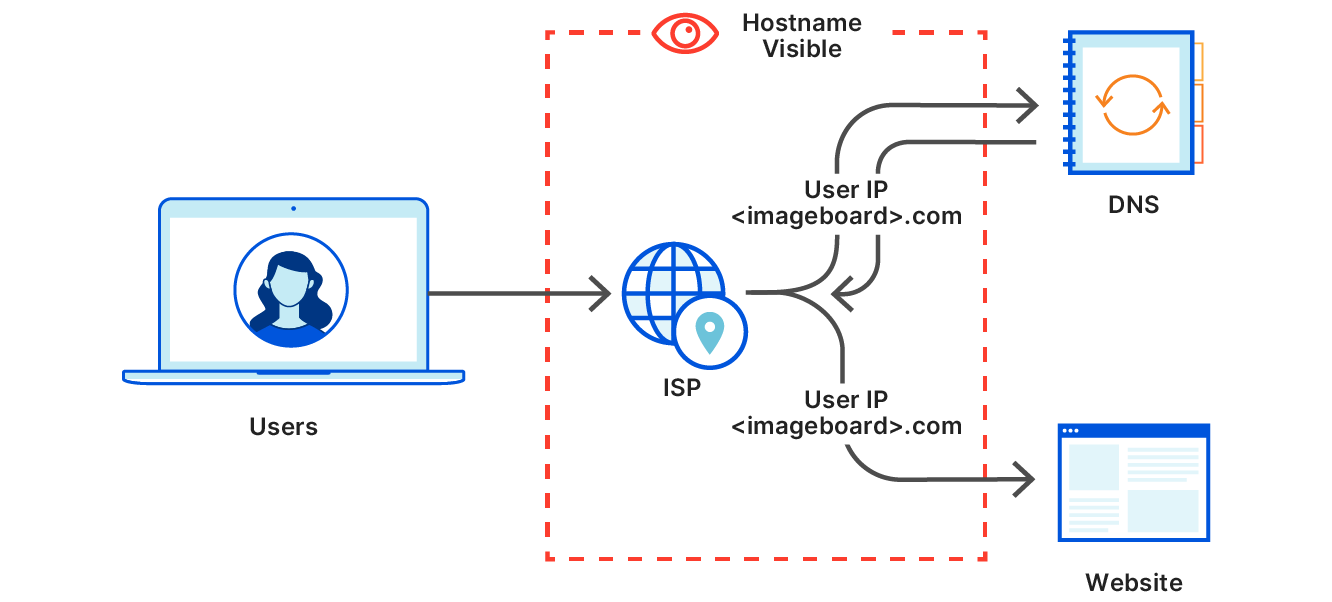
Because all traffic passes through your internet provider, ISPs can observe certain connection details by default, which we explain in detail in what your ISP can and cannot see online.
DNS Filtering and Resolution
DNS acts as the internet’s address book. When you type a website address, a DNS server translates it into an IP address.
If DNS filtering is used:
- requests for certain domains are blocked or redirected
- the website never receives your request
- the block occurs before any connection is established
Because DNS operates early in the connection process, DNS-based blocking is widely used for content filtering. Some restrictions occur before a website is ever contacted, often through DNS filtering, which is why changing DNS settings sometimes works and sometimes has no effect, as explained in why changing DNS sometimes works.
IP-Based Blocking
IP-based blocking occurs when traffic to specific servers or IP ranges is blocked at the network level.
This type of block:
- prevents connections to specific infrastructure
- can affect multiple websites hosted on the same server
- is less precise than DNS filtering
IP blocks are harder to maintain and are usually reserved for more targeted restrictions.
Platform-Level Enforcement
Most access restrictions users encounter today are enforced by platforms rather than networks.
Platforms control:
- which content is visible
- who can access services
- how regional licensing is applied
- how accounts are restricted or suspended
These decisions are made internally by the service, not by your ISP. In many cases, access restrictions are enforced directly by the service itself, including deliberate blocking of VPN traffic for risk or licensing reasons, which we explain in why some websites block VPN users.
Account and Identity Controls
Once you log into a service, access is governed by account-level systems.
These include:
- age verification
- subscription status
- location signals
- behavior-based enforcement
At this layer, your IP address is only one signal among many.
Where Privacy Tools Fit In
Privacy tools like VPNs operate at the network routing layer.
A VPN:
- encrypts traffic between your device and the VPN server
- hides destination websites from your ISP
- replaces your visible IP address with that of the VPN server
This changes how traffic is seen by network operators, but it does not modify platform rules or account status. Many privacy misunderstandings come from confusing browser features with network tools, which is why it’s important to understand what actually changes when using private browsing versus a VPN.
What VPNs Can Change
VPNs can be effective when restrictions occur at the network or DNS layer.
They may:
- bypass DNS-based filtering
- prevent ISP-level domain blocking
- reduce visibility on public or shared networks
In these cases, the VPN changes the network path before filtering occurs.
What VPNs Cannot Change
VPNs do not affect:
- platform moderation decisions
- account-based restrictions
- age verification systems
- subscription or licensing enforcement
If access is denied by the service itself, changing your network path does not override that decision.
Why Blocking Feels Inconsistent
Users often experience inconsistent access because different restrictions operate simultaneously.
For example:
- a DNS block may be removed, but platform restrictions remain
- a VPN may bypass ISP filtering, but the service enforces region rules
- a website may load, but content remains unavailable
Understanding the layer where a block occurs explains why some solutions work only part of the time.
Common Myths About Internet Blocking
“All blocking happens at the ISP level”
False. Most restrictions today are enforced by platforms.
“Changing IP location fixes all access issues”
False. Many controls are account-based.
“VPNs make you anonymous online”
False. VPNs protect network privacy, not platform identity.
Practical Takeaways
- Internet blocking operates across multiple layers
- VPNs affect network routing, not platform decisions
- DNS filtering is common and relatively easy to bypass
- Account-level controls are unaffected by network tools
Choosing the right tool depends on understanding where the restriction is applied.
Frequently Asked Questions
Can my ISP see which websites I visit?
Without a VPN, ISPs can often see DNS requests and destination IPs. With a VPN, they can see that a VPN is used, but not the websites accessed.
Does changing DNS bypass all blocks?
No. It may bypass DNS-based filtering but not IP or platform-level restrictions.
Are VPNs legal to use?
Yes. VPNs are legal in most countries and widely used for privacy and security.
Final Verdict
Internet access and blocking are not controlled by a single switch. They are the result of layered systems managed by ISPs, platforms, and service providers.
VPNs are effective tools within their technical scope, but they are not universal solutions. Understanding how blocking and access actually work helps set realistic expectations and avoid common misconceptions.