Table of Contents
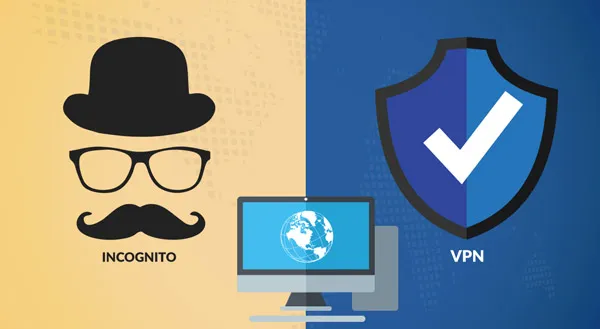
Private browsing modes and VPNs are often mentioned together as privacy tools, but they operate in very different ways and protect against different types of visibility.
Many users assume that opening a private or incognito window hides activity from websites, ISPs, or employers in the same way a VPN does. This misunderstanding leads to false expectations and confusion when privacy tools do not behave as expected.
This article explains what private browsing actually does, what a VPN actually changes, and how their effects differ in practice.
What Private Browsing Is Designed to Do
Private browsing, sometimes called incognito mode, is a browser feature focused on local privacy.
When private browsing is enabled, the browser:
- does not save browsing history locally
- clears cookies and site data after the session ends
- prevents stored logins from persisting
The goal is to prevent activity from being stored on the device, not to hide it from the internet.
What Private Browsing Does Not Do
Private browsing does not change how traffic travels across the internet.
It does not:
- hide your IP address from websites
- prevent ISPs from seeing connections
- encrypt traffic beyond standard HTTPS
- bypass network or platform restrictions
From the perspective of external parties, private browsing looks the same as normal browsing.
What a VPN Is Designed to Do
A VPN operates at the network layer.
When a VPN is active:
- traffic is encrypted between your device and the VPN server
- your visible IP address is replaced by the VPN server’s IP
- your ISP cannot see destination websites
A VPN changes how your connection appears to the outside world, not how your browser stores data locally.
What a VPN Does Not Do
Despite common claims, a VPN does not:
- make you anonymous to websites you log into
- prevent platforms from enforcing rules
- remove account-based tracking
- override age verification or licensing systems
A VPN protects network privacy, not identity.
Comparing Private Browsing and VPNs
| Feature | Private Browsing | VPN |
|---|---|---|
| Hides local history | Yes | No |
| Hides activity from ISP | No | Yes |
| Changes IP address | No | Yes |
| Encrypts traffic | No | Yes |
| Bypasses platform rules | No | No |
This comparison highlights why the two tools are often confused but serve different purposes.
Private browsing and VPNs affect different layers of online activity, which we explain in our guide on how internet blocking and privacy work across different layers.
Why Private Browsing Still Matters
Private browsing can be useful for:
- shared or public devices
- avoiding saved logins
- testing websites without stored data
It improves privacy on the device, not on the network.
Why VPNs Still Matter
VPNs are useful for:
- reducing ISP-level visibility
- protecting traffic on public Wi-Fi
- avoiding local network filtering
They improve privacy between your device and the internet, not inside services you use.
While private browsing only hides your local history, VPNs such as Surfshark go a step further by encrypting your entire connection and masking your IP address.
Using Both Together
Private browsing and VPNs can be used together, but their effects do not overlap.
Using both:
- prevents local data storage
- encrypts network traffic
It does not:
- prevent account tracking
- bypass service restrictions
Each tool operates independently.
Common Myths About Private Browsing and VPNs
“Incognito hides everything”
False. It hides local history only.
“A VPN replaces private browsing”
False. They solve different problems.
“Using both makes you anonymous”
False. Accounts still identify users.
Practical Takeaways
- Private browsing protects local device privacy
- VPNs protect network-level privacy
- Neither tool bypasses platform rules
- Understanding their roles prevents misuse
Choosing the right tool depends on what you want to protect and from whom.
Frequently Asked Questions
Can my ISP see activity in private browsing mode?
Yes. Private browsing does not hide activity from ISPs.
Can websites tell I’m using private browsing?
They cannot directly detect it, but behavior may differ due to missing cookies.
Is it legal to use a VPN?
Yes. VPNs are legal in most countries.
Final Verdict
Private browsing and VPNs are often confused because both are described as privacy tools. In practice, they address different risks.
Private browsing limits what is stored on your device. VPNs limit what is visible on the network. Neither replaces the other, and neither overrides platform enforcement or identity-based controls.
Understanding what actually changes helps users choose the right tool without unrealistic expectations.